Short answer: add one TXT record named _dmarc with the value v=DMARC1; p=none in your DNS panel. That is safe on day one and satisfies Gmail and Yahoo. After SPF and DKIM have passed for a week or two, change p=none to p=quarantine. It is a domain setting, not a plugin setting.
The email test showed Domain protection policy (DMARC) — Needs setup. DMARC is the shortest of the three records and the only one you can write yourself. Since 2024, Gmail and Yahoo expect it; without it, even well-signed email can be filed as spam.
This is a domain setting, not a plugin setting. DMARC is one TXT record in your domain’s DNS. Easy Form Builder reads whether it exists; no form plugin can publish it for you.
Video: DMARC in 2 minutes — your domain’s protection policy —
What DMARC is, in one sentence
DMARC is the rule on your domain that tells mailboxes what to do with an email that fails the other two checks (SPF and DKIM): let it through, send it to spam, or reject it — and where to send reports about it.
Because DMARC depends on SPF or DKIM passing, do those first. Adding DMARC with a strict policy before they work would send your own email to spam.
Step 1 — choose the policy (start with “monitor”)
| Policy | Meaning | When |
|---|---|---|
p=none | Only monitor and report; nothing is blocked | Start here. Safe on day one. |
p=quarantine | Failing email goes to spam | After SPF and DKIM have passed for a week or two |
p=reject | Failing email is refused | Later, when every service that sends for you is aligned |
p=none already counts as “DMARC present” for Gmail and Yahoo, so it raises your score immediately.
Step 2 — open your DNS records
- Cloudflare: log in → your domain → DNS → Records.
- Elsewhere: the DNS / Zone Editor page of your registrar or host.
Check there is no existing record with the name _dmarc. A domain has exactly one.
Step 3 — add the record
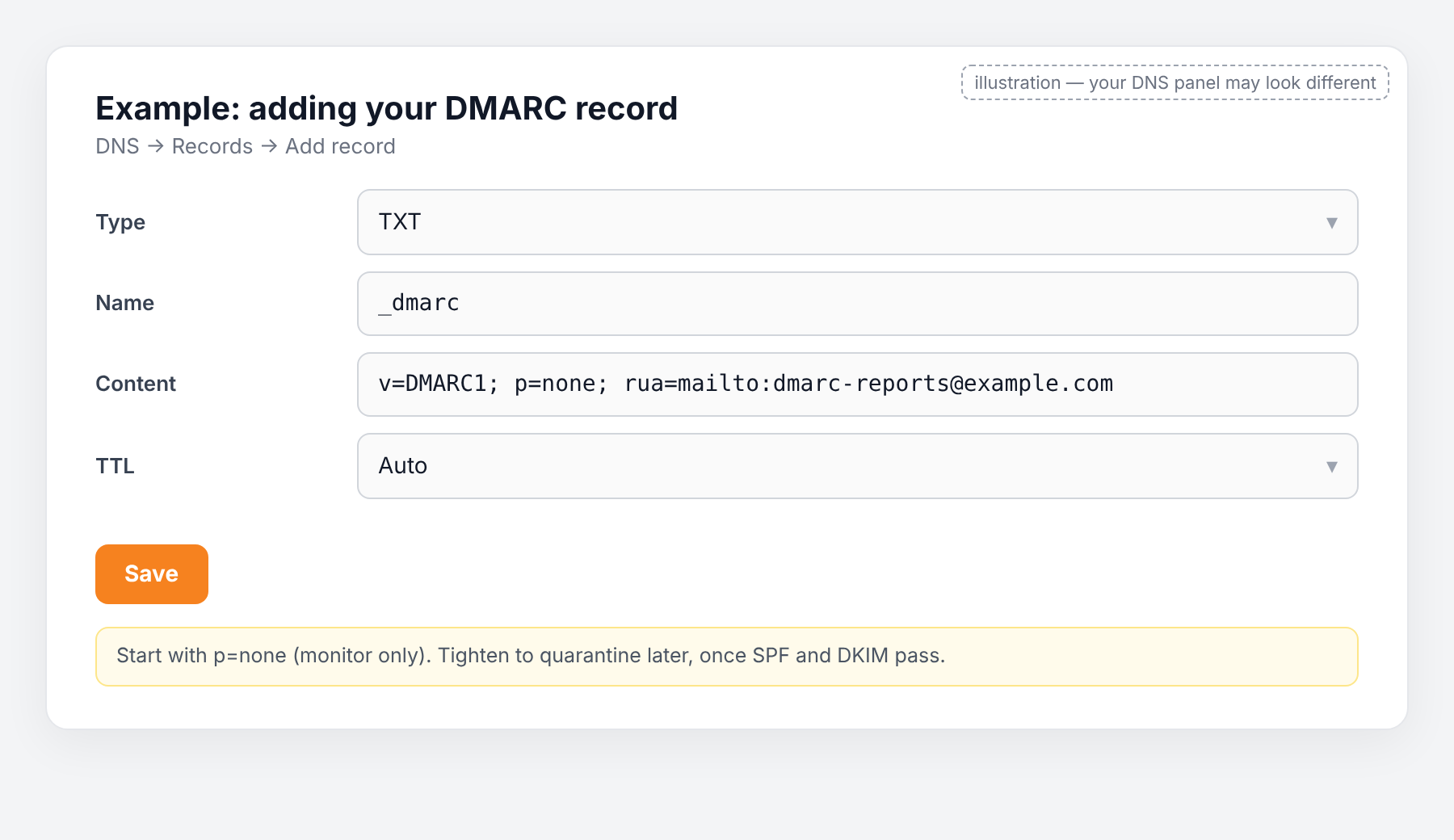
Press Add record:
| Field | Value |
|---|---|
| Type | TXT |
| Name | _dmarc |
| Content | v=DMARC1; p=none; rua=mailto:[email protected] — use an address on your domain that you read |
| TTL | Auto |
The rua= part is optional but useful: mailboxes send you a daily summary of who sent email in your name and whether it passed. If you do not want reports, use v=DMARC1; p=none.
Press Save.
Step 4 — test again
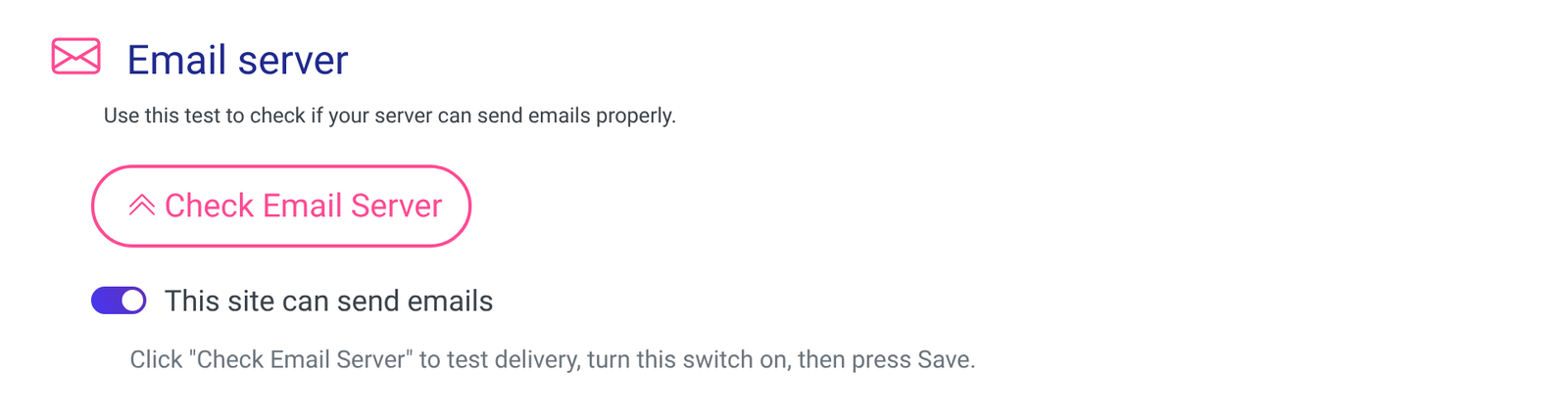
Five minutes to a few hours later, run Easy Form Builder → Settings → Email Settings → Check Email Server. Domain protection policy (DMARC) should say Looks good.
Step 5 — tighten it later (optional)
When the test shows SPF and DKIM as Looks good and has for a week or two, edit the record and change p=none to p=quarantine. That is the setting that actually protects your domain from forgery. Only move to p=reject when you are sure every service that sends for you (your host, newsletter tool, CRM…) passes.
Common mistakes
- Starting with
p=reject. If SPF or DKIM is not aligned, your own email is refused. - Name entered as
_dmarc.example.com.example.com. Enter only_dmarc; the panel adds the domain. - A second
_dmarcrecord. Mailboxes ignore both. - A report address that does not exist. Reports bounce; use a real mailbox or leave
rua=out.
Frequently asked questions
Do I need to read the reports? No. They are XML files meant for tools. The record works without you reading them.
Can DMARC fix a low score on its own? Partly. It removes the “no policy” penalty, but the trust comes from SPF and DKIM passing. Do all three.
I use a subdomain for my site (shop.example.com). The record still goes on the main domain (_dmarc.example.com); subdomains inherit it unless you add their own.
Production notes for the video (editor: delete this block once the video is embedded)
Video script (narration for NotebookLM, English, about 90 seconds)
Last one: Domain protection policy, D-MARC, needs setup. Good news — this is the shortest record of the three, and you write it yourself.
D-MARC is a rule on your domain. It tells mailboxes what to do when an email fails the other two checks, S-P-F and D-KIM: let it through, send it to spam, or reject it. Since 2024 Gmail and Yahoo expect every domain to have this rule. Without it, even good email can be filed as spam.
Like the others, it lives in your DNS, not in WordPress and not in the form plugin. So: Cloudflare, or your registrar. DNS, records, add record. Type TXT. Name: underscore d-marc. Content: v equals DMARC1, semicolon, p equals none. That’s it — “p equals none” means monitor only, nothing is blocked, and it is safe on day one. Save.
Wait a little, run Check Email Server in Easy Form Builder, and the policy line turns green.
One more tip: once S-P-F and D-KIM have passed for a week or two, change “none” to “quarantine”. That is when D-MARC actually starts protecting your domain from forgery.
That’s all three records. Your form emails now have every reason to land in the inbox.
Screen recording — shot list
- Test result with Domain protection policy (DMARC) — Needs setup (3 s).
- Cloudflare DNS → Records, search
_dmarc, nothing found (3 s). - Add record: TXT,
_dmarc,v=DMARC1; p=none; rua=mailto:…, Save (8 s, zoom on content). - Check Email Server → DMARC Looks good (4 s).
- Later: edit the record,
p=none→p=quarantine(4 s) — “after SPF and DKIM pass for a week”.
Ready-made prompt for any AI assistant
[My details — replace]
My domain: example.com
My DNS is managed at: (Cloudflare / registrar / hosting panel)
Current test result: SPF: … DKIM: … DMARC: Needs setup
An email address on my domain that I read (for reports), or "no reports": …

[Instructions — do not change]
You are helping a non-technical WordPress site owner add a DMARC record. This is a DNS setting;
the form plugin cannot do it. Start with p=none; only suggest quarantine or reject if I tell you
SPF and DKIM have been passing for at least a week.
1. Give me the record as three fields: Type, Name, Content — ready to paste.
2. Walk me through adding it in my DNS panel, one step at a time; ask what I see before continuing.
3. End with: how long to wait, how to re-check in Easy Form Builder → Settings → Email Settings,
   and when it is safe to change p=none to p=quarantine.